Geilomat XBox-Controller-Konfiguration

Mich hat die etwas "unintuitive" Bedienung des xbox jog controllers schon etwas länger genervt. Gestern Abend habe ich mal Abhilfe geschaffen in Form eines neuen "glade.hal". Das habe ich vorerst nur bei meinem "privaten" CNC-Starter installiert, will es euch aber nicht vorenthalten. Besonderheit ist die intuitive Bedienrichtung (Z-Stick nach unten -> Z-Achse fährt nach unten etc.) Es folgt das Wunderwerk. Beste Grüße, Vic ---8<--- # two "or" functions, a 2bit multiplexer plus three scalers loadrt or2 count=2 loadrt mux4 count=1 loadrt scale count=3 # now we add them to the slower realtime thread: servo-thread addf or2.0 servo-thread addf or2.1 servo-thread addf mux4.0 servo-thread addf scale.0 servo-thread addf scale.1 servo-thread addf scale.2 servo-thread # define speed settings setp mux4.0.in0 0 # 0 => no motion unless a button is pressed setp mux4.0.in1 50 # 50mm/min for touch off setp mux4.0.in2 600 # medium speed setp mux4.0.in3 2000 # rapid movement # define 3 nets that hold our button inputs and map them to the "or" functions # slow = X, medium = A, fast = B net pad-speed-slow or2.0.in0 input.0.btn-x net pad-speed-med or2.1.in0 input.0.btn-a net pad-speed-fast or2.0.in1 or2.1.in1 input.0.btn-b # Map will look like this: # Bit 1 | Bit 0 | Resulting Speed | Button Pressed # ------+-------+-----------------+--------------- # 0 | 0 | 0 | None # 0 | 1 | 50 | X # 1 | 0 | 600 | A # 1 | 1 | 2000 | B net joy-speed-1 mux4.0.sel0 <= or2.0.out net joy-speed-2 mux4.0.sel1 <= or2.1.out # map the result of the multiplexer to halui.jog-speed net joy-speed-res halui.jog-speed <= mux4.0.out ########################## # analog control of axis # ########################## ### new model by Vic for more intuitive jog motion * 2016-04-02 ### # set scaling factors for analog joystick net scaled-x scale.0.in <= input.0.abs-x-position setp scale.0.gain 1 net scaled-y scale.1.in <= input.0.abs-y-position setp scale.1.gain -1 net scaled-z scale.2.in <= input.0.abs-ry-position setp scale.2.gain -1 # feed scaled signal into halui net joy-x-jog halui.jog.0.analog <= scale.0.out net joy-y-jog halui.jog.1.analog <= scale.1.out net joy-z-jog halui.jog.2.analog <= scale.2.out # digital control of axis net joy-x-minus halui.jog.0.minus <= input.0.abs-hat0x-is-neg net joy-x-plus halui.jog.0.plus <= input.0.abs-hat0x-is-pos net joy-y-minus halui.jog.1.minus <= input.0.abs-hat0y-is-pos net joy-y-plus halui.jog.1.plus <= input.0.abs-hat0y-is-neg net joy-z-minus halui.jog.2.minus <= input.0.btn-tr net joy-z-plus halui.jog.2.plus <= input.0.btn-tl ######### END OF XBOX CONTROLLER CONFIG # show the current spindle speed in the top hoizontal bar # we used the motion.spindle-speed thing allready in the main hal config, so use the netname here to map it

Hi! cool, werd ich mal testen :) Löst das eigentlich auch das Problem, dass der Controller unberechenbar reagiert? Das fand ich eigentlich immer schlecht und verwende daher lieber die Tastatur. Ich muss auch mal die Config vom Metalab wieder mit dem github synchronisieren... Da könnte man sowas dann auch einpflegen. LG Sebastian On 04/03/2016 06:47 PM, Peter Franck wrote:
Mich hat die etwas "unintuitive" Bedienung des xbox jog controllers schon etwas länger genervt. Gestern Abend habe ich mal Abhilfe geschaffen in Form eines neuen "glade.hal".
Das habe ich vorerst nur bei meinem "privaten" CNC-Starter installiert, will es euch aber nicht vorenthalten. Besonderheit ist die intuitive Bedienrichtung (Z-Stick nach unten -> Z-Achse fährt nach unten etc.)
Es folgt das Wunderwerk.
Beste Grüße, Vic
---8<--- # two "or" functions, a 2bit multiplexer plus three scalers loadrt or2 count=2 loadrt mux4 count=1 loadrt scale count=3
# now we add them to the slower realtime thread: servo-thread addf or2.0 servo-thread addf or2.1 servo-thread addf mux4.0 servo-thread addf scale.0 servo-thread addf scale.1 servo-thread addf scale.2 servo-thread
# define speed settings setp mux4.0.in0 0 # 0 => no motion unless a button is pressed setp mux4.0.in1 50 # 50mm/min for touch off setp mux4.0.in2 600 # medium speed setp mux4.0.in3 2000 # rapid movement
# define 3 nets that hold our button inputs and map them to the "or" functions # slow = X, medium = A, fast = B net pad-speed-slow or2.0.in0 input.0.btn-x net pad-speed-med or2.1.in0 input.0.btn-a net pad-speed-fast or2.0.in1 or2.1.in1 input.0.btn-b
# Map will look like this: # Bit 1 | Bit 0 | Resulting Speed | Button Pressed # ------+-------+-----------------+--------------- # 0 | 0 | 0 | None # 0 | 1 | 50 | X # 1 | 0 | 600 | A # 1 | 1 | 2000 | B
net joy-speed-1 mux4.0.sel0 <= or2.0.out net joy-speed-2 mux4.0.sel1 <= or2.1.out
# map the result of the multiplexer to halui.jog-speed net joy-speed-res halui.jog-speed <= mux4.0.out
########################## # analog control of axis # ##########################
### new model by Vic for more intuitive jog motion * 2016-04-02 ###
# set scaling factors for analog joystick net scaled-x scale.0.in <= input.0.abs-x-position setp scale.0.gain 1 net scaled-y scale.1.in <= input.0.abs-y-position setp scale.1.gain -1 net scaled-z scale.2.in <= input.0.abs-ry-position setp scale.2.gain -1
# feed scaled signal into halui net joy-x-jog halui.jog.0.analog <= scale.0.out net joy-y-jog halui.jog.1.analog <= scale.1.out net joy-z-jog halui.jog.2.analog <= scale.2.out
# digital control of axis net joy-x-minus halui.jog.0.minus <= input.0.abs-hat0x-is-neg net joy-x-plus halui.jog.0.plus <= input.0.abs-hat0x-is-pos
net joy-y-minus halui.jog.1.minus <= input.0.abs-hat0y-is-pos net joy-y-plus halui.jog.1.plus <= input.0.abs-hat0y-is-neg
net joy-z-minus halui.jog.2.minus <= input.0.btn-tr net joy-z-plus halui.jog.2.plus <= input.0.btn-tl
######### END OF XBOX CONTROLLER CONFIG
# show the current spindle speed in the top hoizontal bar # we used the motion.spindle-speed thing allready in the main hal config, so use the netname here to map it
_______________________________________________ CNC mailing list CNC@lists.metalab.at https://lists.metalab.at/mailman/listinfo/cnc
Hi! On 04/03/2016 07:13 PM, Peter Franck wrote:
On 04/03/2016 07:10 PM, Sebastian Bachmann wrote:
Löst das eigentlich auch das Problem, dass der Controller unberechenbar reagiert? Das fand ich eigentlich immer schlecht und verwende daher lieber die Tastatur.
In welcher Form unberechenbar?
Zumindest am CNC PC im Lab reagieren die Tasten manchmal nicht und plótzlich fährt er dann los. Dann fährt er uU auch weiter obwohl man losgelassen hat. Kann natürlich sein, dass es ein Konfigurationsproblem ist - denn mit dem Logitech Controller der früher mal dran war ging es Problemlos. Oder hast du das Problem noch nie gehabt? Dann isses vielleicht auch ein Bedienfehler (oder es ist verschwunden) LG Sebastian
On 04/03/2016 07:26 PM, Sebastian Bachmann wrote:
Hi!
On 04/03/2016 07:13 PM, Peter Franck wrote:
On 04/03/2016 07:10 PM, Sebastian Bachmann wrote:
Löst das eigentlich auch das Problem, dass der Controller unberechenbar reagiert? Das fand ich eigentlich immer schlecht und verwende daher lieber die Tastatur.
In welcher Form unberechenbar?
Zumindest am CNC PC im Lab reagieren die Tasten manchmal nicht und plótzlich fährt er dann los. Dann fährt er uU auch weiter obwohl man losgelassen hat. Kann natürlich sein, dass es ein Konfigurationsproblem ist - denn mit dem Logitech Controller der früher mal dran war ging es Problemlos. Oder hast du das Problem noch nie gehabt? Dann isses vielleicht auch ein Bedienfehler (oder es ist verschwunden)
Ich vermute mal, dass es mit der Umsetzung einer Empfehlung aus dem LinuxCNC-Wiki zusammenhängt. Da heißt es: --- 7. Reverse any Axis that go in the wrong direction To reverse the direction of an axis add the following, in my case both Y and Z were backwards. setp input.0.abs-y-scale -127.5 setp input.0.abs-rz-scale -127.5 --- Das führte bei meinen Versuchen zu unkontrollierten Bewegungen, sobald man die Tasten X, A oder B drückt. Diese Empfehlung ist leider scheiße, aber ich hab bei dem Wiki keinen edit-button gefunden :-( Gruß, Vic.
So sieht die Lösung als "Schaltung" aus... Sorry für die lausige Qualität. Mehr hat die Liste nicht zugelassen.
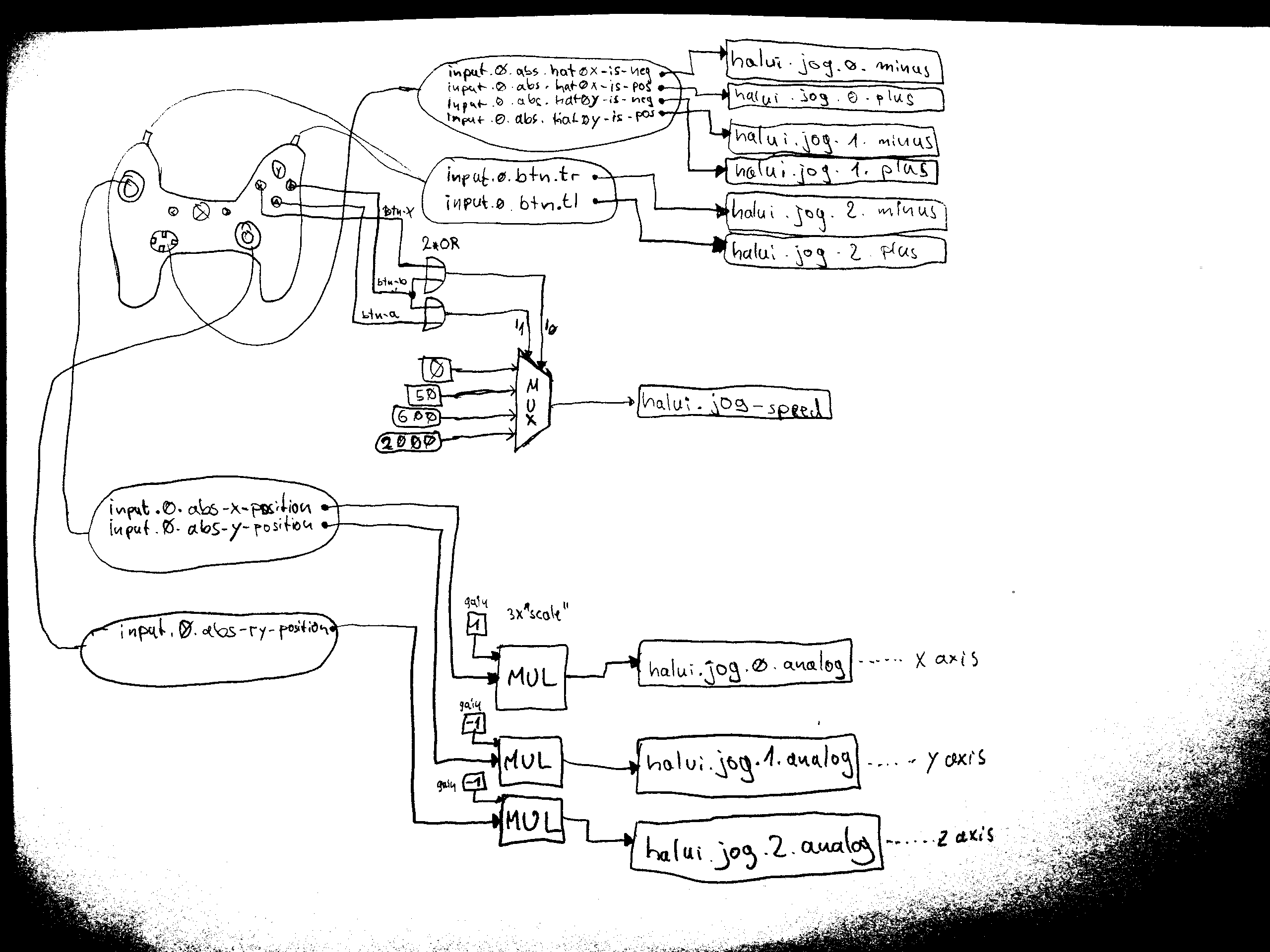

Hallo Vic! E-Mail inkl. Anhang dürfen leider nur insgesamt 150 kB ausmachen. Du warst bei Deinem vorletzten Versuch (habe es erst gerade gesehen) ganz knapp drüber. Aber danke für das s/w-Bild. :) LG, Hobbes -----Original Message----- From: CNC [mailto:cnc-bounces@lists.metalab.at]On Behalf Of Peter Franck Sent: Monday, April 04, 2016 5:38 PM To: cnc@lists.metalab.at Subject: Re: [CNC] Geilomat XBox-Controller-Konfiguration So sieht die Lösung als "Schaltung" aus... Sorry für die lausige Qualität. Mehr hat die Liste nicht zugelassen.
Teilnehmer (3)
-
 Hobbes
 -
 Peter Franck
 -
 Sebastian Bachmann